
Learn how to troubleshoot problems when you can’t print, email, or save as a PDF from QuickBooks Desktop.
If you can’t print, email, or save as a PDF from QuickBooks Desktop, we have the tools to help.
Errors the Print and PDF Repair tool can fix
- There is a problem connecting to your currently selected printer, Microsoft XPS Document writer on XPS port.
- Could not print to printer.
- Error: QuickBooks can't complete the current action due to a missing component: Missing pdf file component.
- QuickBooks is not responding.
- PDF Converter shows offline.
- You cannot print directly to the QuickBooks PDF Converter.
- The device is not ready.
- Unable to save as .pdf file.
- QuickBooks could not save your form or reports as a .pdf.
- QuickBooks freezes when you try to reconcile accounts.
- Print Driver Host for 32-bit Applications has Stopped Working.
- Unrecoverable error.
- QuickBooks PDF Converter Activation Error -20, -30, or -41.
- Error 1722 or 1801 when installing PDF Converter.
- Problems printing transactions or reports.
- Reconcile window disappears or doesn't show
Solution 1: Run the QuickBooks Print & Print Repair Tool from the QuickBooks Tool Hub
Step 1: Download and install the QuickBooks Tool Hub
The QuickBooks Tool Hub helps fix common errors. You'll need to close QuickBooks to use the tool hub. For the best experience, we recommend you use Tool Hub on Windows 10, 64-bit.
- Close QuickBooks.
- Download the most recent version (1.6.0.3) of the QuickBooks Tool Hub. Save the file somewhere you can easily find it (like your Downloads folder or your Windows desktop). Note: If you've installed Tool Hub before, you can find out which version you have. Select the Home tab. The version will be on the bottom.
- Open the file you downloaded (QuickBooksToolHub.exe).
- Follow the on-screen steps to install and agree to the terms and conditions.
- When the install finishes, double-click the icon on your Windows desktop to open the tool hub.

Note: If you can't find the icon, do a search in Windows for QuickBooks Tool Hub and select the program.
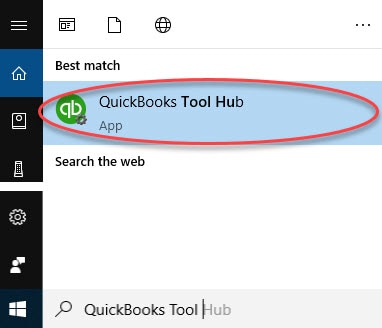
Step 2: Run the QuickBooks PDF & Print Repair Tool
- In the QuickBooks Tool Hub, select Program Problems.
- Select QuickBooks PDF & Print Repair Tool. It will take about a minute to run.
- Print, email, or save as a PDF from QuickBooks Desktop again.
If this doesn't fix the issue, move on to the next solution.
Solution 2: Restart and reset your temp folder permissions
Step 1: Restart your computer
Restart your computer and then try again. If this doesn't fix the issue, reset your temp folder permissions.
Step 2: Reset your temp folder permissions
- Press the Windows key + R to open the RUN command.
- Type %TEMP% and press Enter.
- Right-click an empty area of the temp folder, and select Properties.
- Select Security.
- Make sure all user names and groups in Security have Full Control.
- Once the permissions have been set to Full Control, save as a PDF again in QuickBooks.
Step 3: Test if you can print to your XPS (only for Save as PDF and Email issues)
QuickBooks uses parts of the XPS Document Writer (Microsoft Windows product) to save as a PDF. Test to see if you can print to your XPS Document Writer.
- Open Notepad.
- Type Test. Select File and then Print.
- Select the XPS Document Writer, and then Print.
- Type a filename and save it to your desktop.
- Go to your desktop and view the XPS document you printed from notepad.
If you can't print to your XPS printer (or actual printer) outside of QuickBooks, you'll need to contact your IT professional or Microsoft for help.
Solution 3: Create a new template or form
- Create a new template for your form. Get more help with creating new templates.
- Change the template on your transaction.
- Create your .pdf.
Solution 4: Update the Print Spooler service properties
- Right click Start, select Run, then type Services.msc and select Ok.
- Search for Print Spooler service.
- Right-click on Print Spooler service and select Properties.
- Go to Startup type, select Automatic, then Apply and then OK.
- Right-click on Print Spooler service and select start to start the service.
You should be able to save or email a PDF.
Reconcile window disappears or doesn't show
If QuickBooks appears to lock up after you select reconcile from the Banking menu, but PDF functions work, the reconcile window may show off screen.
- Look at all open windows to see if your reconcile window is listed.
- Select Close All and begin the reconcile again.
If you continue to get an error while you reconcile accounts, get more help with unrecoverable errors.
If you still have an issue, you'll need to contact your IT professional or Microsoft for help.