
Learn how to install and set up QuickBooks Desktop on a server so computers on your network can access your company files.
Want to share your QuickBooks Desktop for Windows data with multiple users? You can set up a multi-user network to access your company files from other computers.
The setup requires you to adjust settings in QuickBooks Desktop, Windows, and your server.
Step 1: Set up QuickBooks Desktop
On a multi-user network, 1 computer hosts your company files. This is your server computer. Computers that connect to your network that don't host your company files are called work stations.
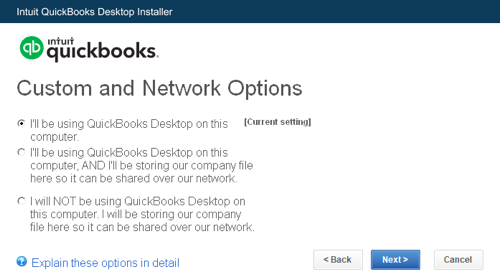
- If you haven't already, follow the steps to download and then install QuickBooks Desktop on your server computer.
- Select Custom and Network install for the install type.
- Select I'll be using QuickBooks Desktop on this computer, AND I'll be storing... if you want the full version of QuickBooks Desktop on your server computer. If you just want your server computer to host your files, select I will NOT be using QuickBooks Desktop on this computer...
- Follow the on-screen instructions to finish the install.
We strongly recommend keeping your company files on your server computer's local hard drive. This makes it easier to share them over your network.
If you want to keep your files on a network drive, follow the steps to map the drive. Then come back to this article.
Step 2: Set folder permissions
Follow the steps to set up folder permissions on your server computer. Make sure the folder with your company files has permission to be on your network.
Step 3: Install Database Server Manager
If you follow the steps in Step 1, QuickBooks also installs QuickBooks Database Server Manager on your server computer. This tool lets you share your company files with other computers over your network.
Make sure QuickBooks Database Server Manager is installed.
Step 4: Adjust firewall and security settings
Follow the steps to configure your Firewall and Internet security settings so QuickBooks and Database Server Manager can run on your network.
Step 5: Set admin rights
Make sure the user account you use to sign in to your server computer has Windows admin rights.
Also, make sure the Windows user account for Database Server Manager has admin rights.
Step 6: Use Database Server Manager
After you install the Database Server Manager, follow the steps and use it to scan the folder that holds your company files.
Step 7: Turn on hosting
Now that you've set up everything outside of QuickBooks, all you need to do is turn on Multi-user Access on your server computer. Your server computer should be the only computer with this feature on.
- In QuickBooks Desktop, go to the File menu and hover over Utilities.
- Select Host Multi-User Access. Then select Yes to confirm.
Step 8: Install QuickBooks on a workstation
Now that your files are hosted over the network from the server, let's install on your workstations.
1. Download and install QuickBooks Desktop on your workstations.
2. Select Custom and Network install for the install type.
3. Select I will be using QuickBooks Desktop on this computer.
4. Follow the on-screen instructions to finish the install.
When you want to access your multi-user network, sign in as a user with admin rights on your server computer and workstations.
Check out How to install QuickBooks Desktop for help installing on your workstations.